JSON Web Token JWT 示例
44440 开源 | 2021-3-24-
本示例使用SpringBoot进行配置和编码。

引入依赖:
<dependencies>
	<!-- 核心模块,包括自动配置支持、日志和YAML -->
	<dependency>
		<groupId>org.springframework.boot</groupId>
		<artifactId>spring-boot-starter</artifactId>
	</dependency>
	<!-- 测试模块,包括JUnit、Hamcrest、Mockito -->
	<dependency>
		<groupId>org.springframework.boot</groupId>
		<artifactId>spring-boot-starter-test</artifactId>
		<scope>test</scope>
	</dependency>
	<!-- 日志依赖(TRANCE < DRBUG < INFO < WARN < ERROR <FATAL < OFF) -->
	<dependency>
		<groupId>org.springframework.boot</groupId>
		<artifactId>spring-boot-starter-logging</artifactId>
	</dependency>
	<!-- 支持web -->
	<dependency>
		<groupId>org.springframework.boot</groupId>
		<artifactId>spring-boot-starter-web</artifactId>
	</dependency>
	<dependency>
		<groupId>com.auth0</groupId>
		<artifactId>java-jwt</artifactId>
		<version>3.4.0</version>
	</dependency>
</dependencies>
因为示例仅使用JWT,所以这里定义两个注解类用来标记那个方法是需要验证那个不需要:
import java.lang.annotation.ElementType;
import java.lang.annotation.Retention;
import java.lang.annotation.RetentionPolicy;
import java.lang.annotation.Target;

/**
 * 用来跳过验证的PassToken
 */
@Target({ ElementType.METHOD, ElementType.TYPE })
@Retention(RetentionPolicy.RUNTIME)
public @interface PassToken {
	boolean required() default true;
}
import java.lang.annotation.ElementType; import java.lang.annotation.Retention; import java.lang.annotation.RetentionPolicy; import java.lang.annotation.Target; /** * 需要登录才能进行操作的注解UserLoginToken * */ @Target({ElementType.METHOD, ElementType.TYPE}) @Retention(RetentionPolicy.RUNTIME) public @interface UserLoginToken { boolean required() default true; }@Target:注解的作用目标
@Target(ElementType.TYPE)——接口、类、枚举、注解
@Target(ElementType.FIELD)——字段、枚举的常量
@Target(ElementType.METHOD)——方法
@Target(ElementType.PARAMETER)——方法参数
@Target(ElementType.CONSTRUCTOR) ——构造函数
@Target(ElementType.LOCAL_VARIABLE)——局部变量
@Target(ElementType.ANNOTATION_TYPE)——注解
@Target(ElementType.PACKAGE)——包
@Retention:注解的保留位置
RetentionPolicy.SOURCE:这种类型的Annotations只在源代码级别保留,编译时就会被忽略,在class字节码文件中不包含。
RetentionPolicy.CLASS:这种类型的Annotations编译时被保留,默认的保留策略,在class文件中存在,但JVM将会忽略,运行时无法获得。
RetentionPolicy.RUNTIME:这种类型的Annotations将被JVM保留,所以他们能在运行时被JVM或其他使用反射机制的代码所读取和使用。
@Document:说明该注解将被包含在javadoc中
@Inherited:说明子类可以继承父类中的该注解
实体对象,为了示例简单,这个对象就当作自己的service了:
import org.springframework.stereotype.Service;
import com.auth0.jwt.JWT;
import com.auth0.jwt.algorithms.Algorithm;

@Service
public class User {
    String Id = "0";
    String username = "admin";
    String password = "1";

    public User getUserById(String id) {
    	return new User();
    }

    public String getToken(User user) {
        String token="";
        token= JWT.create().withAudience(user.getId()).sign(Algorithm.HMAC256(user.getPassword()));
        return token;
    }

	public String getId() {
		return Id;
	}
	public void setId(String id) {
		Id = id;
	}
	public String getUsername() {
		return username;
	}
	public void setUsername(String username) {
		this.username = username;
	}
	public String getPassword() {
		return password;
	}
	public void setPassword(String password) {
		this.password = password;
	}
}
Algorithm.HMAC256():使用HS256生成token,密钥则是用户的密码,唯一密钥的话可以保存在服务端。
withAudience()存入需要保存在token的信息,这里把用户ID存入token中。
写一个拦截器去获取token并验证token
import java.lang.reflect.Method;
import javax.servlet.http.HttpServletRequest;
import javax.servlet.http.HttpServletResponse;
import org.springframework.beans.factory.annotation.Autowired;
import org.springframework.web.method.HandlerMethod;
import org.springframework.web.servlet.HandlerInterceptor;
import com.auth0.jwt.JWT;
import com.auth0.jwt.JWTVerifier;
import com.auth0.jwt.algorithms.Algorithm;
import com.auth0.jwt.exceptions.JWTDecodeException;
import com.auth0.jwt.exceptions.JWTVerificationException;

public class AuthenticationInterceptor implements HandlerInterceptor {
	@Autowired
	private User userSer;

	@Override
	public boolean preHandle(HttpServletRequest httpServletRequest, HttpServletResponse httpServletResponse,
			Object object) throws Exception {
		String token = httpServletRequest.getHeader("token");// 从 http 请求头中取出 token
		// 如果不是映射到方法直接通过
		if (!(object instanceof HandlerMethod)) {
			return true;
		}
		HandlerMethod handlerMethod = (HandlerMethod) object;
		Method method = handlerMethod.getMethod();
		// 检查是否有passtoken注释,有则跳过认证
		if (method.isAnnotationPresent(PassToken.class)) {
			PassToken passToken = method.getAnnotation(PassToken.class);
			if (passToken.required()) {
				return true;
			}
		}
		// 检查有没有需要用户权限的注解
		if (method.isAnnotationPresent(UserLoginToken.class)) {
			UserLoginToken userLoginToken = method.getAnnotation(UserLoginToken.class);
			if (userLoginToken.required()) {
				// 执行认证
				if (token == null) {
					throw new RuntimeException("无token,请重新登录");
				}
				// 获取 token 中的 user id
				String userId;
				try {
					userId = JWT.decode(token).getAudience().get(0);
				} catch (JWTDecodeException j) {
					throw new RuntimeException("401");
				}
				User user = userSer.getUserById(userId);
				if (user == null) {
					throw new RuntimeException("用户不存在,请重新登录");
				}
				// 验证 token
				JWTVerifier jwtVerifier = JWT.require(Algorithm.HMAC256(user.getPassword())).build();
				try {
					jwtVerifier.verify(token);
				} catch (JWTVerificationException e) {
					throw new RuntimeException("401");
				}
				return true;
			}
		}
		return true;
	}
}
实现一个拦截器就需要实现HandlerInterceptor接口
HandlerInterceptor接口主要定义了三个方法
1.boolean preHandle ():
预处理回调方法,实现处理器的预处理,第三个参数为响应的处理器,自定义Controller,返回值为true表示继续流程(如调用下一个拦截器或处理器)或者接着执行
postHandle()和afterCompletion();false表示流程中断,不会继续调用其他的拦截器或处理器,中断执行。
2.void postHandle():
后处理回调方法,实现处理器的后处理(DispatcherServlet进行视图返回渲染之前进行调用),此时我们可以通过modelAndView(模型和视图对象)对模型数据进行处理或对视图进行处理,modelAndView也可能为null。
3.void afterCompletion():
整个请求处理完毕回调方法,该方法也是需要当前对应的Interceptor的preHandle()的返回值为true时才会执行,也就是在DispatcherServlet渲染了对应的视图之后执行。用于进行资源清理。整个请求处理完毕回调方法。如性能监控中我们可以在此记录结束时间并输出消耗时间,还可以进行一些资源清理,类似于try-catch-finally中的finally,但仅调用处理器执行链中
主要流程:
1.从 http 请求头中取出 token,
2.判断是否映射到方法
3.检查是否有passtoken注释,有则跳过认证
4.检查有没有需要用户登录的注解,有则需要取出并验证
5.认证通过则可以访问,不通过会报相关错误信息
配置拦截器
在配置类上添加了注解@Configuration,标明了该类是一个配置类并且会将该类作为一个SpringBean添加到IOC容器内。
import org.springframework.context.annotation.Bean;
import org.springframework.context.annotation.Configuration;
import org.springframework.web.servlet.config.annotation.InterceptorRegistry;
import org.springframework.web.servlet.config.annotation.WebMvcConfigurer;

/**
 * 配置那些资源需要验证
 */
@Configuration
public class InterceptorConfig implements WebMvcConfigurer {
    @Override
    public void addInterceptors(InterceptorRegistry registry) {
        registry.addInterceptor(authenticationInterceptor())
                .addPathPatterns("/**");
    }
    @Bean
    public AuthenticationInterceptor authenticationInterceptor() {
        return new AuthenticationInterceptor();
    }
}
这里拦截所有请求。
编写接口代码,登录接口一般是不验证的。在getMessage()中加上了登录注解,说明该接口必须登录获取token后,在请求头中加上token并通过验证才可以访问。
示例先通过/login获取token,注意这个接口不做任何处理,仅为示例,然后请求头中增加token字段为请求到的值。
import org.springframework.beans.factory.annotation.Autowired; import org.springframework.stereotype.Controller; import org.springframework.web.bind.annotation.GetMapping; import org.springframework.web.bind.annotation.ResponseBody; @Controller public class UserApi { @Autowired private User userSer; /** * 不需要验证,获取token,正常的话这是登录接口,需要验证用户名密码,验证成功后才会生成token,示例写死 */ @GetMapping("/login") @ResponseBody public String login() { User user = userSer.getUserById("0"); String token = user.getToken(user); return token; } /** * 需要验证,有token才能请求到这个接口 */ @UserLoginToken @GetMapping("/getMessage") @ResponseBody public String getMessage() { return "恭喜您,访问成功"; } }启动后访问接口http://localhost:8080/login 获取到token
eyJ0eXAiOiJKV1QiLCJhbGciOiJIUzI1NiJ9.eyJhdWQiOiIwIn0.5dWGdyLwQ2-ji7Ri-rJ7OjPC0Q4FsP-74MRYwM005lc。
然后使用restclient增加一个请求头
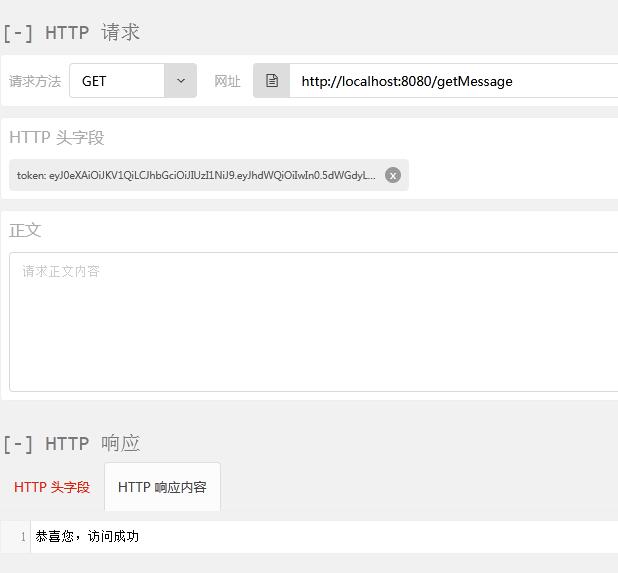
如果直接访问这个接口的话,工程报错,不能访问。
-
猜你喜欢
- 个人资料
-

Java小强
未曾清贫难成人,不经打击老天真。
自古英雄出炼狱,从来富贵入凡尘。
- 站内搜索
-
- 文章分类
- 最新文章
- 热门文章
发表评论: