使用FFmpeg通过RSTP协议拉取视频保存到本地2
13780 开源 | 2026-2-11-
FFmpeg是领先的多媒体框架,能够解码、编码、 转码、复用、解复用、流、过滤和播放 几乎所有人类和机器创建的东西。它支持最模糊的古老格式,直到最前沿。无论它们是由某个标准委员会、社区还是公司设计的。它还具有高度的可移植性:FFmpeg 在各种构建环境、机器架构和配置下跨 Linux、Mac OS X、Microsoft Windows、BSD、Solaris 等 编译、运行和通过我们的测试基础架构 FATE 。

官网:
https://ffmpeg.p2hp.com/index.html (中文)
在之前文章中(http://www.javacui.com/opensource/771.html ),我说道了使用-segment_time参数,指定分隔时常来实时的分拆视频,但是实际使用中发现,视频确实录制上,但是有一个问题,就是滚动条显示的时间,一直是累计的。
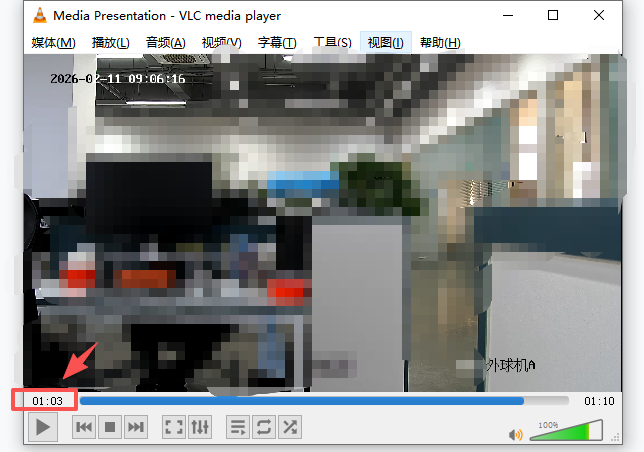
所以这里采用另外一个方案,使用 -t 参数执行视频录制时常,然后通过指定视频路径和名称,就可以直接拿到这个当前录制的视频文件。
改造后的录制测试用例:
import java.io.BufferedReader;
import java.io.File;
import java.io.IOException;
import java.io.InputStreamReader;
import java.util.ArrayList;
import java.util.List;
import java.util.concurrent.TimeUnit;

public class FfmpegWatcher {
    private static final int RECORDING_DURATION_SECONDS = 10;
    private static final String OUTPUT_DIR = "D:\\temp";
    private static final String FFMPEG_PATH = "D:\\Soft\\ffmpeg-6.0-full_build\\bin\\ffmpeg.exe";

    private String rtspUrl;
    private volatile boolean isRunning = false;
    private Process currentProcess = null;

    public FfmpegWatcher(String rtspUrl) {
        this.rtspUrl = rtspUrl;
        // 创建输出目录
        new File(OUTPUT_DIR).mkdirs();
    }

    public void startRecording() {
        isRunning = true;

        System.out.println("开始持续录制,每" + RECORDING_DURATION_SECONDS + "秒生成一个文件");
        System.out.println("输出目录: " + OUTPUT_DIR);
        System.out.println("FFmpeg路径: " + FFMPEG_PATH);

        // 持续循环录制
        while (isRunning) {
            recordSegment();
        }

        System.out.println("录制已停止");
    }

    private void recordSegment() {
        String outputFile = generateOutputFileName();
        System.out.println("开始录制: " + outputFile);

        try {
            // 构建FFmpeg命令
            List<String> command = buildFFmpegCommand(outputFile);

            // 打印命令(用于调试)
            System.out.println("执行命令: " + String.join(" ", command));

            // 创建进程
            ProcessBuilder pb = new ProcessBuilder(command);
            pb.redirectErrorStream(true); // 合并错误流和输出流

            currentProcess = pb.start();

            // 读取FFmpeg输出(在后台线程中)
            Thread outputReader = new Thread(() -> readProcessOutput(currentProcess));
            outputReader.setDaemon(true);
            outputReader.start();

            // 等待录制完成
            boolean finished = currentProcess.waitFor(1, TimeUnit.MINUTES);

            if (finished) {
                System.out.println("录制成功: " + outputFile);
            } else {
                System.err.println("录制失败");
                // 发生错误时等待一段时间再重试
                try {
                    Thread.sleep(5000);
                } catch (InterruptedException ie) {
                    Thread.currentThread().interrupt();
                }
            }
        } catch (InterruptedException e) {
            System.out.println("录制被中断");
            stopCurrentProcess();
            Thread.currentThread().interrupt();

        } catch (Exception e) {
            System.err.println("录制错误: " + e.getMessage());
            e.printStackTrace();
            // 发生错误时等待一段时间再重试
            try {
                Thread.sleep(5000);
            } catch (InterruptedException ie) {
                Thread.currentThread().interrupt();
            }
        } finally {
            currentProcess = null;
        }
    }

    private List<String> buildFFmpegCommand(String outputFile) {
        List<String> command = new ArrayList<>();

        command.add(FFMPEG_PATH);

        // 输入选项
        command.add("-rtsp_transport");
        command.add("tcp"); // 使用TCP传输,更稳定

        command.add("-i");
        command.add(rtspUrl);

        // 录制时长
        command.add("-t");
        command.add(String.valueOf(RECORDING_DURATION_SECONDS));

        // 视频编码参数 - H265转H264
        command.add("-c:v");
        command.add("libx264"); // 使用H264编码

        command.add("-preset");
        command.add("fast"); // 编码速度: ultrafast, fast, medium, slow

        command.add("-crf");
        command.add("23"); // 质量控制: 18-28,越小质量越好

        command.add("-pix_fmt");
        command.add("yuv420p"); // 确保浏览器兼容

        // 音频编码参数
        command.add("-c:a");
        command.add("aac"); // AAC音频编码

        command.add("-b:a");
        command.add("128k"); // 音频码率

        // 输出格式
        command.add("-f");
        command.add("mp4");

        // 覆盖已存在的文件
        command.add("-y");

        // 输出文件
        command.add(outputFile);

        return command;
    }

    private void readProcessOutput(Process process) {
        try (BufferedReader reader = new BufferedReader(
                new InputStreamReader(process.getInputStream()))) {
            String line;
            while ((line = reader.readLine()) != null) {
                // 只打印重要信息,避免日志过多
                if (line.contains("frame=") || line.contains("time=") ||
                        line.contains("error") || line.contains("Error")) {
                    System.out.println("[FFmpeg] " + line.trim());
                }
            }
        } catch (IOException e) {
            // 进程结束时会抛出异常,正常情况
        }
    }

    private void stopCurrentProcess() {
        if (currentProcess != null && currentProcess.isAlive()) {
            currentProcess.destroy();
            try {
                currentProcess.waitFor();
            } catch (InterruptedException e) {
                currentProcess.destroyForcibly();
            }
        }
    }

    private String generateOutputFileName() {
        // 使用时间戳(毫秒)作为文件名,确保唯一性
        long timestamp = System.currentTimeMillis();
        return OUTPUT_DIR + File.separator + timestamp + ".mp4";
    }

    public void stopRecording() {
        isRunning = false;
        stopCurrentProcess();
        System.out.println("正在停止录制...");
    }

    public static void main(String[] args) {
        // 替换为你的RTSP地址
        String rtspUrl = "rtsp://admin:123456@192.168.1.18:554/h265";

        if (args.length > 0) {
            rtspUrl = args[0];
        }

        // 检查FFmpeg是否存在
        File ffmpegFile = new File(FFMPEG_PATH);
        if (!ffmpegFile.exists()) {
            System.err.println("错误: FFmpeg程序不存在: " + FFMPEG_PATH);
            System.err.println("请修改FFMPEG_PATH常量为正确的路径");
            System.exit(1);
        }

        FfmpegWatcher recorder = new FfmpegWatcher(rtspUrl);

        // 添加关闭钩子,确保优雅退出
        Runtime.getRuntime().addShutdownHook(new Thread(() -> {
            recorder.stopRecording();
            System.out.println("程序已退出");
        }));

        System.out.println("开始录制RTSP流: " + rtspUrl);
        System.out.println("按Ctrl+C停止录制");

        recorder.startRecording();
    }

}
特别注意的是
boolean finished = currentProcess.waitFor(1, TimeUnit.MINUTES);
增加等待时间,防止无限期的等待。因为可能发生网络中断等不可控因素。
-
猜你喜欢
- 个人资料
-

Java小强
未曾清贫难成人,不经打击老天真。
自古英雄出炼狱,从来富贵入凡尘。
- 站内搜索
-
- 文章分类
- 最新文章
- 热门文章
发表评论: